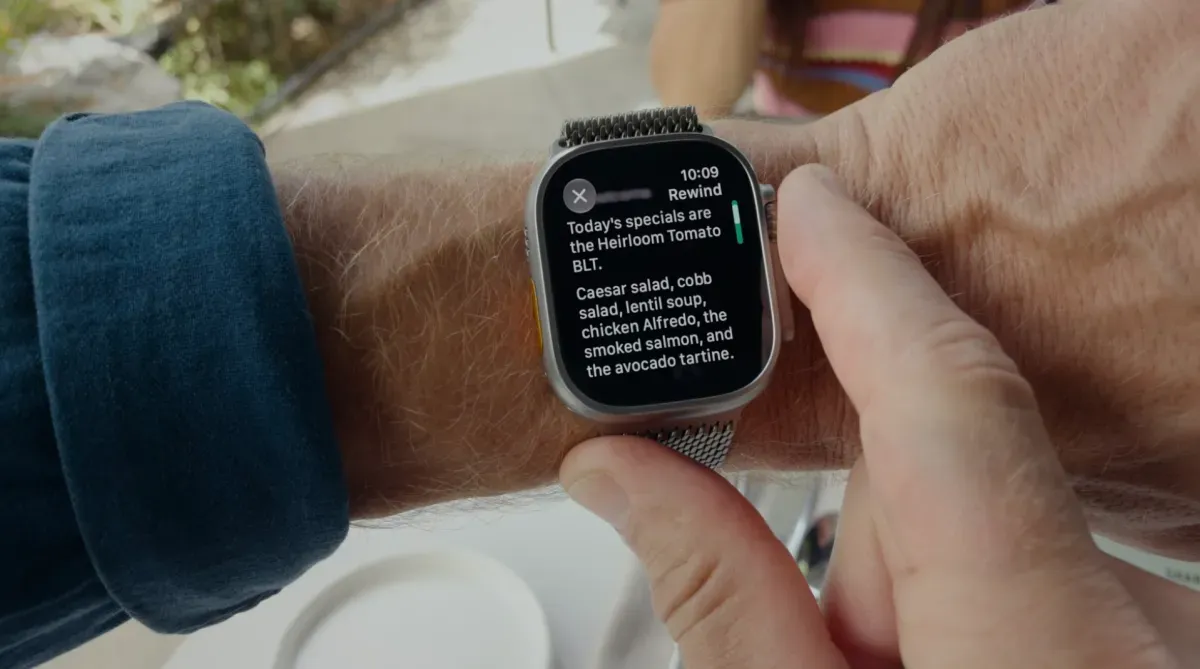
What are the new Apple Audio Intelligence features?
Apple has introduced a suite of four AI-driven capabilities within the iOS 27.3 and watchOS 27.3 developer betas, specifically targeting Apple Watch Series 12 hardware. These features are designed to enhance environmental awareness and information retention through advanced audio processing.
- Sound Detection: Identifies critical environmental noises, such as doorbells or alarms, providing essential assistance for deaf and hard-of-hearing users.
- Song Identification: Uses integrated Shazam technology to recognize music playing in the vicinity.
- Live Rewind: Allows users to access a transcript or playback of the previous 15 seconds of audio to catch missed dialogue.
- Siri Recaps: Summarizes conversations throughout the day to create organized notes of important verbal information.
While sound and song detection function as specialized utility tools, Live Rewind and Siri Recaps represent a shift toward proactive audio monitoring and summarization.
How does Siri Recaps function in daily life?
Siri Recaps acts as an automated digital scribe, capturing verbal details that might otherwise be forgotten during fast-paced interactions. In real-world testing, the feature proved particularly effective during transactional scenarios, such as vehicle service appointments or rental car handovers.
During these interactions, employees often deliver complex information regarding pricing, repair timelines, and specific policies at a speed that makes manual note-taking difficult. Siri Recaps can successfully extract and document these specific data points, such as insurance deductibles, expected completion dates, or fuel levels in a rental vehicle. This capability transforms the Apple Watch from a passive wearable into an active tool for information management.
The challenge of information categorization
Despite its utility, the current iteration of Siri Recaps faces challenges regarding how it organizes captured data. Users may find that the AI blends distinct topics into a single, unstructured note. For example, details from a professional car repair appointment might be merged with subsequent domestic discussions about family schedules or household errands. This lack of granular segmentation can make the resulting summaries feel cluttered and difficult to navigate for long-term reference.
What privacy protections are in place for audio recording?
Apple has implemented several layers of privacy safeguards to address the concerns associated with devices that are constantly monitoring audio. The primary defense mechanism is on-device processing, which ensures that audio data and the resulting AI models are handled locally whenever possible.
To further protect user identity and sensitive information, Apple utilizes several specific redaction and anonymization techniques:
- Speaker Anonymization: The system is designed to avoid identifying individual speakers within a conversation.
- Raw Audio Protection: Apple does not store the original, unedited audio files.
- Data Redaction: The AI is programmed to automatically redact sensitive personal information, such as government-issued identification numbers or private account details.
While these technical measures mitigate the risk of data breaches, the psychological impact of "always-on" technology remains a point of contention for many users who find the concept of pervasive listening unsettling.
What are the limitations of AI-assisted note-taking?
The primary limitation of current AI note-taking is the difficulty in distinguishing between essential information and "noise." Because the system is designed to be comprehensive, it often captures non-essential conversational filler that lacks long-term value.
For instance, a user might find their daily recap filled with trivial details, such as a casual mention of what television program the family intends to watch. While such details might be useful for personal journaling, they often clutter the primary objective of the tool: capturing actionable tasks and important facts. This creates a tension between the desire for total recall and the need for concise, relevant summaries.
Proposed improvements for user workflow
To address these friction points, several functional improvements could enhance the user experience. Currently, removing an irrelevant bullet point requires entering a manual edit mode, which is cumbersome for a quick correction. A more efficient interface might include a "swipe-to-delete" gesture for individual items within a recap.
Furthermore, users have expressed a need for better integration with existing productivity ecosystems. An automated setting to export "bookmarked" Siri Recaps directly to the Apple Notes app would allow for more seamless organization. Creating dedicated folders for these summaries would prevent them from being lost among general-purpose notes and turn them into a reliable repository for daily reminders and tasks.
Frequently asked questions
Which Apple Watch models support these new features?
The new Audio Intelligence features, including Siri Recaps and Live Rewind, are specifically designed for users with the Apple Watch Series 12. These features are being rolled out via the iOS 27.3 and watchOS 27.3 developer betas.
Is my raw audio being sent to Apple's servers?
No, Apple utilizes on-device processing to handle audio and run AI models locally. The company has stated that it does not store raw audio files and employs redaction techniques to protect sensitive personal information like ID numbers.
Can Siri Recaps distinguish between different topics?
Currently, Siri Recaps may struggle with topic segmentation, sometimes mixing professional information with personal household discussions in a single note. Users may need to manually organize or move these notes to separate headings or different apps.
What is the difference between Live Rewind and Siri Recaps?
Live Rewind is a short-term tool that allows you to review the last 15 seconds of audio to catch missed words. Siri Recaps is a long-term tool that summarizes conversations throughout the day into organized notes.
Does the feature identify who is speaking?
No, the AI features are designed to prioritize privacy by not identifying individual speakers during the transcription or summarization process, ensuring that the focus remains on the content rather than the identity of the participants.
Key takeaways
- Siri Recaps provides automated daily conversation summaries for Apple Watch Series 12 users.
- On-device processing and data redaction are used to protect user privacy and sensitive information.
- The tool is highly effective for capturing verbal details in fast-paced transactional environments.
- Current limitations include difficulty in separating essential facts from trivial conversational filler.
Conclusion
Apple's introduction of Siri Recaps and Live Rewind marks a significant step in the evolution of wearable AI. While the technology offers undeniable benefits for information retention and accessibility—particularly for those managing busy schedules or navigating hearing impairments—it also introduces new challenges regarding digital privacy and information management. The success of these features will likely depend on Apple's ability to refine how the AI categorizes information and how seamlessly it integrates with existing productivity workflows. As users become accustomed to more pervasive audio intelligence, the balance between utility and the feeling of constant surveillance will remain a central theme in consumer technology.